
🔹 How Taxi Culture Has Changed in Korea
These days in Korea, it’s rare to catch a taxi by waving your hand on the street.
Instead, most taxis are booked through taxi apps.
Not only is this much more convenient, but it also helps prevent common issues — like drivers taking unnecessarily longer routes when dealing with foreigners.
Using taxi apps allows you to set your destination in advance, making the ride more transparent and reliable.
✅ Kakao T vs Uber for USFK

The main taxi apps USFK personnel can use in Korea include the following:
📌 Kakao T
- Typically the simplest long-term option once you have a daily routine in Korea
- Best choice if you want one app to rely on consistently
📌 Uber
- Familiar interface, and you may already have it installed
- In Korea, it’s not the primary taxi-hailing app for most locals, so you may see fewer matches
- Often works best in tourist-heavy or high-traffic areas, and can feel less reliable outside those zones
📌 k.ride
- A Kakao service designed mainly for short-term visitors, especially those without a Korean phone number
- Useful for tourists, but for long-term USFK personnel who will typically have a local number, Kakao T is usually the more straightforward option
For most USFK personnel living in Korea, Kakao T will be the most practical default option for calling a taxi.
If you want a simple recommendation: use Kakao T as your main taxi app, and treat Uber as a backup when it happens to match faster.
✅ Kakao T Setup
1️⃣ Install the app
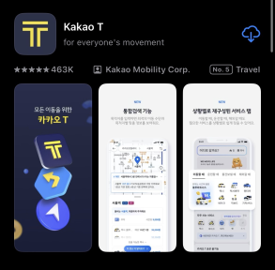
Download Kakao T on your phone.
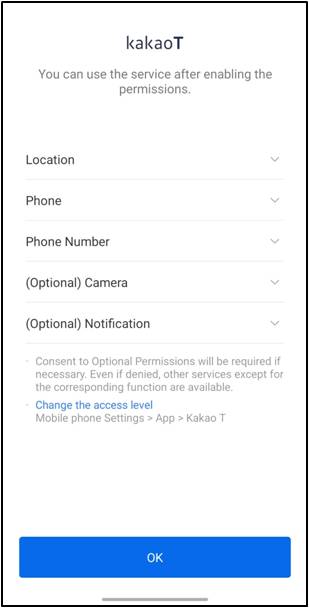
After installing the Kakao T app, this is the first screen you’ll see — just like the image shown above.
2️⃣ Account / login
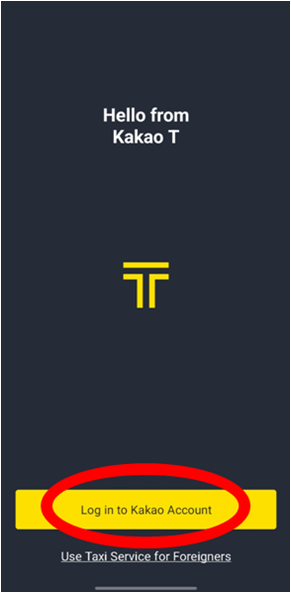
After completing the permission setup on the initial screen, you’ll be taken to a screen like the one shown above.
At this point, tap the area marked with the red circle.
Do not select “Use taxi service for foreigners,” as this will redirect you to the K-Ride app mentioned earlier.
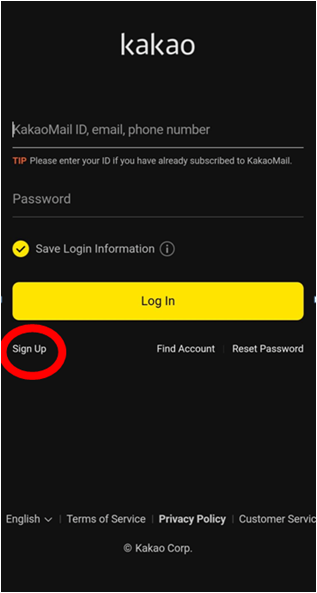
Once you reach a screen like the one shown above, the next step is to sign up for Kakao T. The Kakao account you create will also be used across other apps with “Kakao” in the name that you may encounter later, so it’s important to remember your login details.
To use Kakao T, you must have a Kakao account.
You can create a Kakao account with either a Korean phone number or an overseas phone number.
However, account verification typically requires SMS-based phone verification.
(Practical note: Some travelers experience SMS issues when they’re outside their home country, and certain overseas SIM/USIM plans may not reliably receive verification texts. If SMS verification fails, account setup can be delayed. For these reasons, registering with a Korean phone number is recommended.)
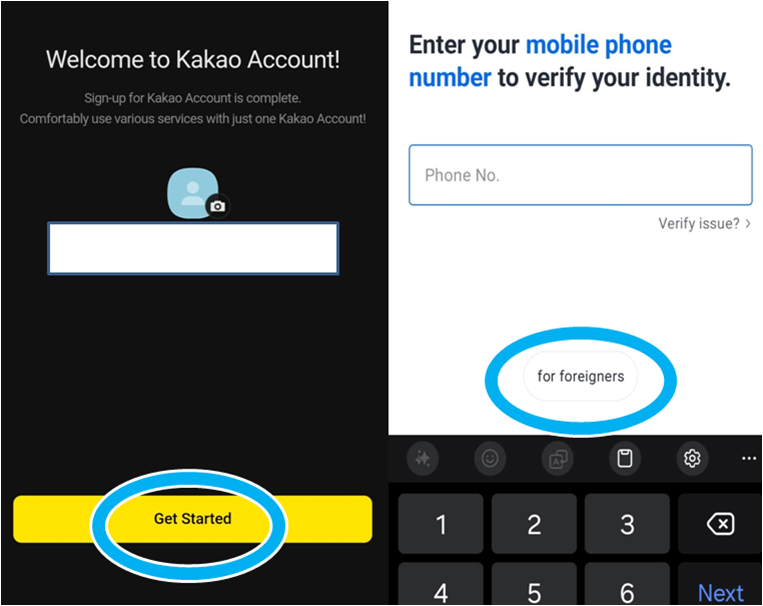
After completing the sign-up process, two screens like the ones shown above will appear in sequence.On the screen on the right, do not enter your phone number. Instead, tap the area marked with the blue circle, which will take you to the mobile carrier verification process for foreigners with a Korean phone number.
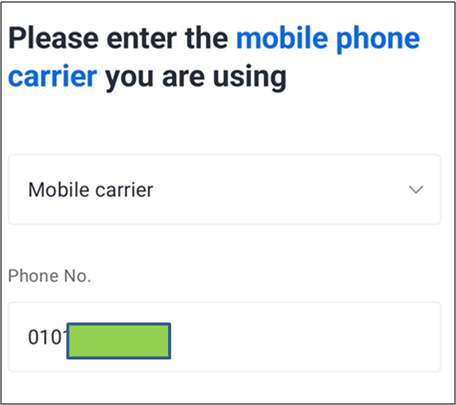
On the next screen, enter your phone number in the format 010########.
On the next screen, you’ll see a prompt saying “Register your payment method for faster payment.”Since international cards need to be added through a different method, just tap “Later” on this screen.
With this, the basic setup for Kakao T is now complete.
3️⃣ Payment method (best approach for USFK)

Kakao T allows you to register internationally issued cards, including Visa, Mastercard, American Express, and JCB.
That said, some users report that when a Kakao account is created using an overseas phone number, card registration can occasionally fail during the setup process. Because of this, if you have a Korean number (which most long-term USFK personnel will), it’s generally smoother to create your Kakao account using a Korean phone number.
Even if you plan to register a card, it’s still useful to know the simple fallback option: you can select “Pay to driver” and pay at the end of the ride using whatever the taxi accepts.
✅ How to Call a Taxi in Kakao T (Practical Steps)
1️⃣ Set your destination

Start by entering your destination in Kakao T. The most reliable method is selecting a place directly from the search results (instead of typing something vague), so the app pins the correct location.
If you’re going somewhere common (base gate, subway station, mall, landmarks), choosing the exact listing helps avoid confusion.
2️⃣ Set your pickup point

Next, set your pickup point carefully. Don’t assume the default pin is correct—zoom in and place it exactly where you can stand and where a car can safely stop.
This matters most when:
- you’re on a main road with traffic moving both directions
- there are multiple entrances (mall, apartment complex, large building)
- the pickup pin lands on the opposite side of the street
A correct pickup pin reduces delays and prevents last-minute confusion.
3️⃣ Choose your payment method
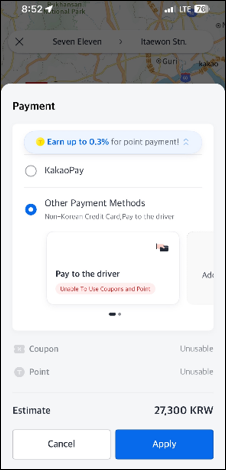
Before you request the taxi, confirm how you’ll pay.
If you don’t have a Korean bank account, you can typically choose either in-app payment using a registered Visa, Mastercard, American Express, or JCB card, or Pay to driver—whichever is more convenient for you.
If you select Pay to driver, it means you’ll pay the driver directly at the end of the ride (when you get out), rather than paying inside the app. This option is useful even if you have a registered card, because it keeps the payment step simple and avoids unexpected issues.
✅ Common Friction Points
Even after setup, there are a few practical issues USFK users commonly run into when using Kakao T day-to-day.
🔍 Drivers may call instead of texting

Many drivers will call quickly rather than text, especially when they can’t find the pickup spot. If you don’t answer, the ride may be delayed or canceled.
For USFK users, the issue is that the call may be in Korean. If that happens, the simplest approach is:
- Answer the call briefly
- Use Google Translate (or a short saved message) to confirm your location
- Or say a short line like: “I'm waving my hand.”
Even if you can’t have a full conversation, answering quickly often prevents unnecessary cancellations.
🔍 Similar pickup names / multiple entrances
Large malls, station exits, and apartment complexes often have multiple pickup zones with similar names. Selecting the wrong entrance can add several minutes and creates “where are you?” moments.
🔍 High-demand periods (late night / hard to get a match)

During very late-night hours, or right after major events, matching can take longer and cancellations happen more often.
In those situations, you can try switching to a premium taxi option in the app—such as a Blue Taxi or Mobeom (Deluxe) Taxi. These are generally more expensive than standard taxis, but they can be easier to match when regular taxis are scarce.
🔍 Base gates and access limits
If you request pickup or drop-off near a gate, remember the driver cannot enter restricted areas. Make sure your pickup point is set to a public roadside location the driver can reach without confusion.
🔍 Language tip (when you do need to communicate)
Most taxi drivers in Korea do not speak much English, so if you ever need to clarify something (destination entrance, or a quick question), using Google Translate can make the situation much easier.
In most rides, you won’t need much conversation as long as the destination is set correctly in the app. But when communication is necessary, a simple approach works well: type one short sentence in English, translate it to Korean, and show it on your screen.
Frequently Asked Questions (FAQ)
❓ Why do drivers cancel after accepting a ride?
A. Drivers may cancel after accepting if the trip looks inefficient—common reasons include very short distances, expected heavy traffic, or a destination where it may be hard to find a return passenger.
This isn’t very common. If it happens and your match gets canceled, simply request another taxi and try again.
❓ Can I get charged if I cancel a matched ride?
A. In some cases, yes. A cancellation fee may apply if you cancel more than 1 minute after a driver has been assigned, or if the driver arrives and waits beyond a set window.
The fee is usually a small amount—typically around ₩500 (about $0.40) for standard taxis, and a few thousand won (roughly $1.50–$3.00) for higher-tier options.
If it was clearly the driver’s fault, a refund may be possible depending on the situation.
❓ What happens if I cancel too often?
A. Repeated cancellations can trigger temporary restrictions. For example, canceling 5+ times within 7 days may lead to a temporary limit (such as a 24-hour restriction) or short cooldown limits on standard requests.
❓ Why does matching take longer late at night or in the rain?
A. Demand spikes during late-night hours, bad weather, and after events. If matching is slow, moving your pickup pin to a clearer roadside spot can help. If available, switching to a premium option (Blue Taxi / Mobeom) can improve match chances, but it typically costs more.