
✅ Using Telecom Membership Discounts

The advanced section will begin by introducing how to receive discounts at convenience stores through telecom apps.
If you’ve just arrived in Korea, you will most likely have set up a Korean phone number.
Once you do that,
- Download your carrier’s official app (SKT / KT / LG U+)
- Complete the phone number verification process
- This automatically registers you for the carrier’s membership program
After that, you can use the app to display a membership barcode and receive discounts at checkout.
1️⃣ What Kind of Discounts?
In most cases, the discount works like this:
- ₩100 off per ₩1,000 spent → about 10% off
- ₩50 off per ₩1,000 spent → about 5% off
The exact rate depends on your membership level (usually tied to how long you’ve been with the carrier or your plan).
2️⃣ Which Carriers Work Where?
- SKT: CU, 7-Eleven
- KT: GS25, emart24
- LG U+: GS25
👉 Each carrier partners with different convenience store brands.
3️⃣ How to Use It

At checkout:
- Open your telecom app
- Display your membership barcode
- Show it to the cashier before payment
👉 The discount will be applied automatically if eligible.
4️⃣ Important Limits
There are usage limits you should know:
- The barcode can usually be used once per day
- There is a daily discount cap (e.g., up to ₩20,000 per day)
These limits change over time (updated yearly)
✅ Buy-One-Get-One Promotions (And How to Store the Extra Item)
Another way to save money at Korean convenience stores is to take advantage of ‘1+1’ or ‘2+1’ deals and keep one of the items for later.
A 1+1 promotion means you receive two items for the price of one, while 2+1 promotions give you three items for the price of two. These promotions are especially common for drinks, snacks, and instant foods.
What many newcomers do not realize is that you do not always need to take the extra items immediately. Korean convenience stores allow customers to store the additional promotional items digitally in the store’s mobile app and pick them up later.
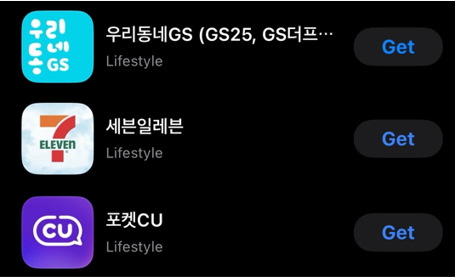
Before using this feature, you are required to install the official apps for the major convenience store chains
📌 GS25 – 우리동네GS - (Search by 'Our GS')
📌 CU – 포켓CU - (Search by 'POCKET CU')
📌 7-Eleven – 세븐일레븐 - (Search by 'SEVEN ELEVEN')
🔍 How to Store Extra Items

When purchasing a promotional item, you can tell the cashier that you would like to store the extra item by saying “keep.” You can then specify how many items you want to store.
For example:
- With a 1+1 promotion, you can store up to one item.
- With a 2+1 promotion, you can store up to two items.

After telling the cashier, open the convenience store app and select the option to display your membership barcode.
Show this barcode to the cashier, who will scan it at the register.
Once the barcode is scanned, the stored item will appear in your app as a saved product, which you can check anytime within the app. As shown in the example above, it will appear in the blue section of the image.
When you want to claim the stored item later, simply open the app again and select the stored product. The app will generate another barcode, which you can show to the cashier. After the barcode is scanned, the item can be picked up just like a normal purchase.
There are a few important things to keep in mind when using this feature.
⚠️ Stored items usually have an expiration period of about 30 days, so they must be used before the expiration date shown in the app.
⚠️ You do not need to return to the same store where you originally purchased the item. Stored items can typically be redeemed at any convenience store location of the same brand.
⚠️ Most of these convenience store apps are primarily available in Korean. However, signing up is usually straightforward if you have a Korean phone number, which most USFK personnel will have after arriving in Korea. Once the account is created, using the app to store or redeem items with the barcode is very simple, since the process mainly involves showing the barcode at the register.
If the Korean interface feels confusing at first, you can simply use screenshot translation tools on your phone during the signup process. After the initial registration, the rest of the features—especially the barcode storage system—are easy to use even without understanding every menu in the app.
✅ Convenience Stores as a Safe Spot

In Korea, convenience stores can function as a reliable place to go if you need help in an uncomfortable or unexpected situation. Most locations are open late, and many operate 24 hours, making them one of the easiest places to access at almost any time.
If you feel unsafe, get lost, or need assistance, going into a convenience store is usually a practical first step. Stores are well-lit, staffed, and commonly equipped with CCTV, which adds an extra layer of safety compared to being outside alone at night.
In more serious situations, staff can help you contact the police using the store’s system or guide you on what to do next. While not every employee may speak fluent English, the environment itself is generally safe and accessible, especially in urban areas.
Overall, convenience stores in Korea are not just places to buy things—they are often the closest and most reliable place to go when you need immediate help.